

Sync inventory across prefixed SKUs
Sync inventory between items that share the same base SKU but use different SKU prefixes—within a single store or across connected stores.
Last updated October 7, 2026
By default, Synkro syncs inventory only between items that have exactly matching SKUs. The Sync inventory across prefixed SKUs feature allows Synkro to also sync inventory between items whose SKUs differ only by a defined prefix.
This is especially useful when:
- Different stores use store-specific SKU prefixes.
- ERP or fulfillment systems prepend identifiers to SKUs.
- You want to maintain a single inventory source across differently named items.
How prefixed SKU matching works
When one or more prefixes are configured, Synkro will ignore those prefixes when determining whether two items should share inventory.
Example
If the prefix 123- is added, Synkro will treat the following SKUs as the same item for inventory syncing:
SHIRT-L123-SHIRT-L
Inventory updates to either item will be synced automatically.
Barcode-based inventory syncing
If your store is using barcode-based inventory syncing mode, the configured prefixes apply to the barcode value instead of the SKU. This means:
- Prefixes are removed from the barcode before matching.
- Inventory will sync between items whose barcodes match after the prefix is ignored.
This allows consistent behavior regardless of whether you are syncing by SKU or barcode.
Works within and across stores
Prefixed SKU syncing works in both of the following scenarios:
- Within the same Shopify store — Inventory will sync between prefixed and non-prefixed items in the same store.
- Across connected stores — Inventory will sync between prefixed items across all connected stores in the Synkro connection.
No additional configuration is required for multi-store setups.
Optional: sync in one direction only
By default, inventory syncs both ways between the base SKU and its prefixed or suffixed versions. If you’d rather have the base SKU be the source of truth, you can switch to one-way syncing.
With one-way syncing turned on:
- Inventory changes on
SHIRT-Lare copied to123-SHIRT-L(and any other prefixed or suffixed versions). - Inventory changes on
123-SHIRT-Lare never copied back toSHIRT-L, or to other prefixed or suffixed versions. 123-SHIRT-Lstill syncs with other items that have the exact same SKU, such as123-SHIRT-Lin another connected store.
This is useful for items like samples (e.g. SHIRT-L-SAMPLE) whose sales shouldn’t affect the main item’s stock.
To turn it on, check Only sync from the base SKU to its prefixed and suffixed versions below the prefix and suffix fields, then click Save. Uncheck it at any time to go back to syncing both ways.
Tip: Turning on one-way syncing doesn’t change existing inventory levels. If any prefixed or suffixed items have drifted from the base item, update the base item’s inventory once to push its level out to them.
How to enable prefixed SKU syncing
To enable this feature:
- Open the Synkro app
- Click Settings
- Select Syncing identifier
- Locate the Sync inventory across prefixed SKUs section
- Add one or more prefixes to enable prefixed SKU matching.
You can manage and update prefixes at any time from this page.
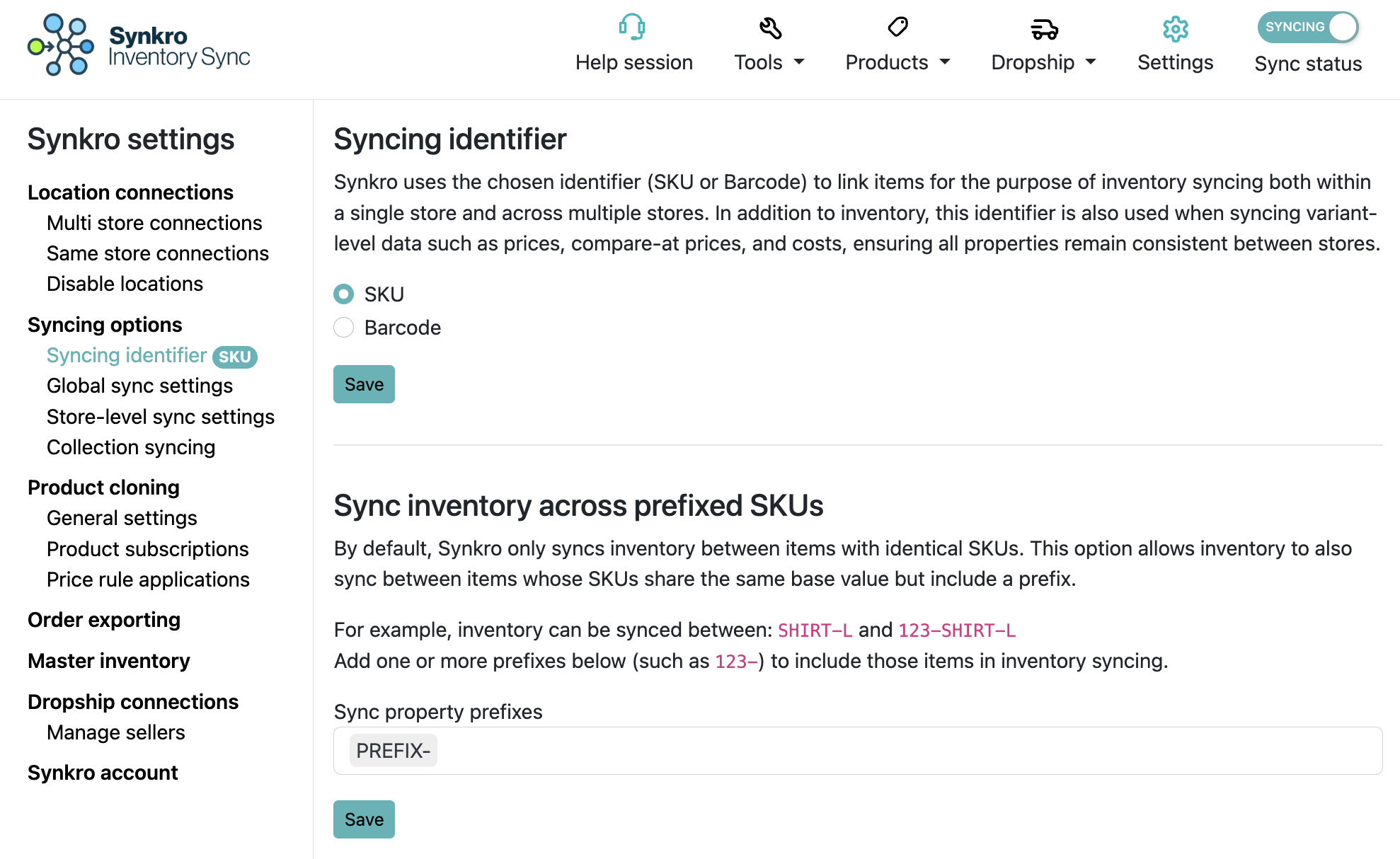 Manage SKU prefixes used for inventory syncing under Sync inventory across prefixed SKUs in the Syncing Identifier settings.