
Product Transformations
Automatically rewrite product details such as the title, description, vendor or price as products are cloned and synced from a parent store into a child store.
Last updated October 21, 2026
Overview
Product transformations rewrite product data as it moves from a parent store into a child store. Each transformation is a find-and-replace applied to the product properties you choose.
Transformations run whenever Synkro clones a product from the source store, and whenever it syncs changes from a parent product to its child products. Common uses include:
- Removing a supplier’s brand name from product titles
- Replacing the vendor name
- Clearing the compare at price
- Setting cloned products to draft
- Using a parent product metafield as the child product’s title
Transformations are created in the child (destination) store. The source can be any store connected to your Synkro account, or a dropship supplier.
Create a transformation
- Open Synkro from the child store and go to
Settings>Product cloning>Product transformations. - Click
Create new transformation. - Select the source store and click
Continue to configuration. - Fill in the Find and Replace with fields, choose the properties to transform, optionally add rules, then click
Save.
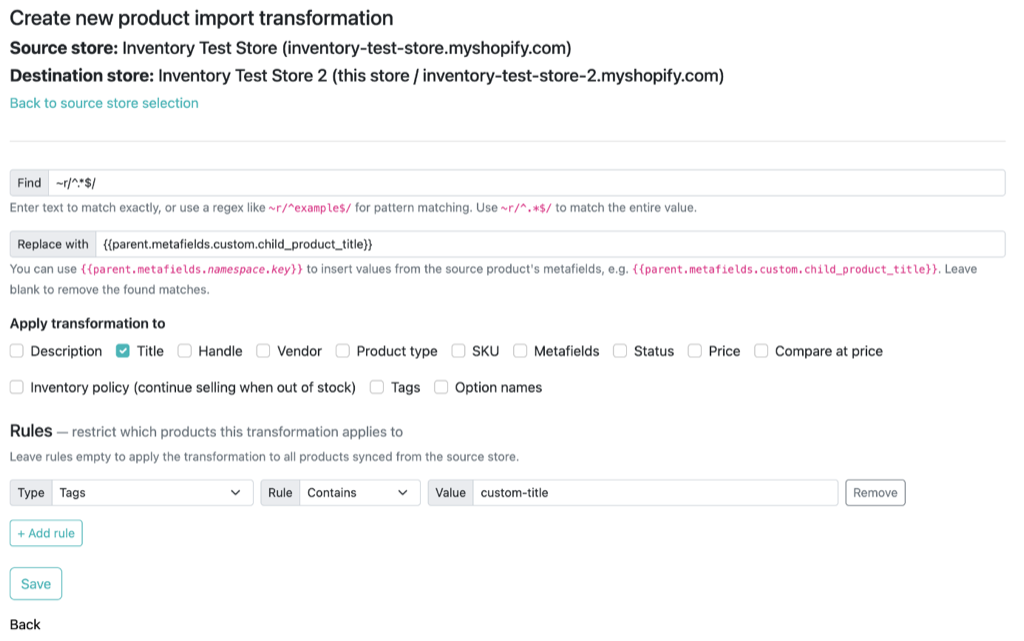 A transformation which sets the child product’s title from a parent product metafield, for products tagged
 custom-title
Saved transformations are listed on the Product transformations page, where they can be viewed, edited or deleted.
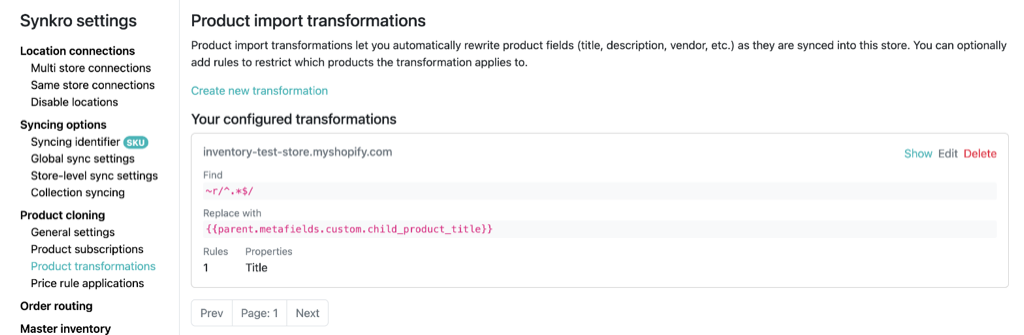 Saved transformations are listed on the
 Product transformations page
Find and replace
| Field | Description |
|---|---|
| Find | Text to match exactly (case sensitive), or a regular expression written as ~r/pattern/. Use ~r/^.*$/ to match the entire value. |
| Replace with | The replacement text. Every match is replaced. Leave blank to remove the matched text. |
To insert a value from the parent product’s metafields, use {{parent.metafields.namespace.key}} in Replace with. For example, Find ~r/^.*$/ and Replace with {{parent.metafields.custom.child_product_title}} on the Title property sets the child product’s title from that metafield.
Properties
Choose one or more properties for the transformation to apply to:
Description, Title, Handle, Vendor, Product type, SKU, Metafields, Status, Price, Compare at price, Inventory policy, Tags and Option names.
Some properties only accept certain values. If the transformed value isn’t valid, the original value is kept:
- Status must become
active,draft,archivedorunlisted. - Price and Compare at price must become a number. A blank compare at price clears it.
When syncing updates, a property is only transformed if Synkro syncs that property to the child store. See Manage syncable product properties.
Rules
Rules limit a transformation to certain products. With no rules, the transformation applies to every product from the source store. When there are several rules, a product must match all of them.
Each rule has a Type, a Rule and a Value. Available types are Vendor, Parent Vendor, Product Type, Product Title, SKU, Tags, Parent Tags, Price, Parent Compare at Price and Tracked. Rules include equals, contains, starts with, is one of (comma-separated list), regex match, and greater/less than for prices.
Multiple transformations
You can create several transformations for the same source store. They run in the order they were created, and each one works on the result of the one before it.